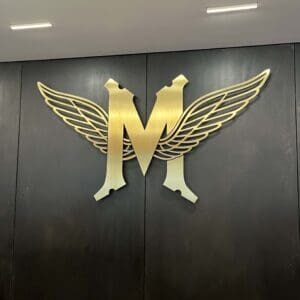
A laser cut logo is one of the best ways to elevate your brand. But bringing that logo to fruition hinges on a single, critical design choice: the font. Without the right fonts for laser cut logos, the whole thing falls apart – literally.
At Profile Laser, we’ve spent years turning digital concepts into high-quality metal masterpieces through precision laser cutting and metal fabrication. One thing we’ve learned over those years is that while a font can look absolutely stunning on a high-resolution screen, it faces a completely different set of physics when meeting a fiber laser or a water jet.
We’ve seen how the right font choice can streamline production and elevate a brand’s physical presence. Here, we’ll break down technical and aesthetic considerations for selecting fonts that are laser-ready and built to last.
What Are the Best Fonts for Laser Cut Logos?
The best fonts for laser cut logos are bold, sans-serif, or specialized stencil fonts that maintain structural integrity. To make sure a logo doesn’t fall apart during the laser cutting process, designers should choose fonts with consistent stroke widths and bridged characters. At Profile Laser, we recommend a minimum stroke thickness equal to the material’s thickness to keep your custom logo durable and professional.
Is Your Font Structurally Sound for Laser Cutting?
When materials like stainless steel, aluminum, or brass are laser cut, the laser follows a path to remove material. If a font is too thin or has disconnected elements, the insides of letters (like the center of an O) simply fall out once the perimeter is cut. These floating pieces are known as islands.
To avoid these islands, many brands opt for stencil versions of fonts. Stencil fonts use small bridges to connect the internal islands to the rest of the material. This ensures the logo remains one solid, durable piece.
What Are Top Fonts for Laser Cut Logos?
When designing for metal fabrication and engraving, certain font families work better than others. Top fonts for laser cut logos include:
- Geometric Sans-Serif: Clean and Modern: Industrial and tech sectors favor fonts like Montserrat, Futura, and Gotham. Their uniform stroke widths make them highly predictable during the fiber laser cutting process. The lines are consistent, meaning there are fewer hot spots where the laser might dwell to long. This results in a cleaner, burr-free edge.
- Slab Serifs: Bold and Rugged: Construction and heavy machinery firms tend to turn to slab serifs like Rockwell or Arvo to convey strength and stability. These thick, blocky fonts provide extra surface area for the laser to bond. This results in highly durable laser cut logos for outdoor signage or heavy-use industrial parts.
- Specialized Stencil Fonts: Ready for Production: To avoid the DIY look of traditional military stencils, modern designers have create sophisticated fonts like Stela UT or Vampiro One. These alternatives are pre-engineered for custom laser cut signage. That means they already include the bridges needed to keep your logo intact without manual adjustments by our CAD team.
How Is Typography Different Between Etching and Cutting?
At Profile Laser, we offer laser etching and engraving along with our cutting services. The best font for your logo may change depending on which service you choose.
- For Laser Cutting: Stick to bolder weights. Thinner hairline fonts can become brittle or melt under the intense heat of the fiber laser. Aim for a minimum line thickness of at least the thickness of the material itself.
- For Laser Etching: Since etching only marks the surface, you have more freedom. Using intricate scripts and fine-lined serifs like Times New Roman or Baskerville won’t cause your project to fall apart. Etching is perfect for high-detail serial numbers or decorative branding on tool plates.
Why Are Kerf and Spacing Critical to Your Logo’s Success?
One word every designer should know is kerf. Kerf is the width of the material removed by the laser beam. Our fiber lasers offer incredible precision, but the kerf still exists.
If your place your letters too closely together (tight kerning), the laser paths may overlap or leave a wall of material that’s so thin it becomes sharp or prone to breaking. We recommend generous letter spacing to ensure each character stands out clearly – especially for 2D CAD designs intended for architectural signage.
Final Laser Cut Logos Fonts Checklist
Before you send your logo to our team for a quote, ask yourself:
- Are there islands? If so, do they need bridges?
- Is the font too thin? Make sure the stroke width is appropriate for the material thickness.
- Is the kerning sufficient? Avoid overlapping paths to prevent structural failure.
Create Your Custom Logo with Profile Laser
Choosing the right font for your laser cut logo is just the first step. You also need a partner who understands the nuances of metal fabrication. At Profile Laser, our team uses advanced CAD technology to review your designs. If your chosen font presents a structural risk, we’ll work with you to literally bridge the gaps for a finished product that’s as durable as it is beautiful.
Whether you need a massive stainless steel logo for your corporate headquarters or precision-etched components for industrial equipment, our Portland-based facility delivers on time and on spec for clients across North America. Contact us today for a same-day quote.