Profile Laser Knowledge Base
All manufacturers want to move a project from design to production more efficiently, and following some basic guidelines for laser cutting design is the best way to do that. When designers hand over a CAD file that accounts for their project’s material type, thickness, geometry, and downstream fabrication requirements, they’re much less likely to run into production delays – and much more likely to walk away with parts that perform better. Keep reading for our tips on how to achieve cleaner features, maintain dimensional accuracy, and reduce unnecessary processing for your laser-cut parts.
What Are The Most Important Laser Cutting Design Guidelines?
The most important laser cutting design guidelines address feature size, hole diameter, slot width, corner geometry, and minimum spacing between cuts. Designers shouldn’t include extremely small features, narrow webs, or tightly grouped cutouts without considering material thickness. Manufacturers should review critical dimensions before production since practical limits vary by material, thickness, tolerance, and equipment.
Why Should You Follow Laser Cutting Design Guidelines?
Laser cutting may give designers immense freedom, but every design still has to work as a physical part. A feature that looks simple on a CAD screen may prove to be more difficult once the laser introduces concentrated heat to the material. For example, we’ve seen how an extremely small hole can lose its definition, a very narrow slot can become difficult to consistently maintain, and a thin strip of metal between adjacent cutouts can distort.
We’ve found that following best practices and involving your fabricator early in the design process helps to avoid these types of production issues. At Profile Laser, our team uses 2D CAD design with fiber laser cutting and our other fabrication services to look beyond the individual cut and consider how the finished component needs to function.
How Should You Design Holes for Laser Cutting?
Laser cut hole design starts with considering the hole diameter and the material thickness. As holes become smaller relative to the sheet thickness, it becomes more challenging to maintain the desired geometry. That’s why we recommend identifying which holes carry critical functional requirements instead of assuming every small hole in a CAD drawing will cut equally well. For example, mounting and alignment holes, fastener locations, and other precision features typically demand tighter control than decorative openings.
A common design approach uses material thickness as an early reference when evaluating small holes, but designers shouldn’t treat that correlation as a universal production tolerance. Material, machine settings, part geometry, and the required finish also play a role.
So what should designers consider when designing holes for laser cutting? We recommend starting with these four factors.
- Material thickness: Thicker material can change the practical minimum size for a clean laser-cut feature.
- Hole function: Determine whether a hole simply provides clearance or must meet a precise fit requirement.
- Hole location: Avoid placing small holes unnecessarily close to an outside edge or another cut feature.
- Secondary operations: If the finished part requires drilling, tapping, countersinking, or another operation, account for that process in the original design.
What Are the Best Laser Cut Slot Design Guidelines?
Laser cut slot design guidelines start with slot width and the amount of material that remains around the feature. Very narrow slots can create manufacturing challenges, especially in thicker materials. Designers also need to consider whether the slot provides ventilation, adjustment, mounting clearance, drainage, or another functional purpose. If increasing the width slightly doesn’t compromise the part’s function, it may improve its manufacturability.
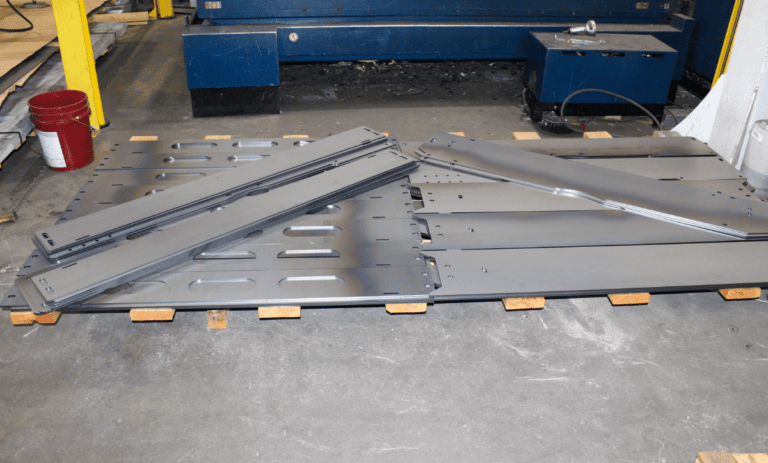
If you’re designing long, closely spaced slots, those deserve extra attention. They can leave narrow strips of metal between cuts, and heat concentrated around those thin sections increases the possibility of movement or distortion.
We always recommend identifying the functional dimensions of your metal part when submitting your design. When we know which slot width, centerline, or overall dimension matters the most, we can evaluate the design with the finished application in mind.
How Should Designers Handle Corners in Laser-Cut Parts?
Laser-cut corner design affects both the part’s appearance and performance. While laser cutting can produce intricate profiles and tight geometry, designers still need to think about what happens after the cutting process.
For example, an outside corner may cut cleanly as part of a flat profile. An inside corner, however, may create a concern if another component has to fit into it. If the mating part has its own radius, thickness, or fabrication tolerance, an extremely sharp CAD corner may not provide the functional clearance the assembly requires.
Designers should also consider forming. A flat laser-cut blank may move to a press brake, and features placed near the bend can behave differently once the material forms. Corners, holes, and slots should always support the final three-dimensional component instead of only the flat drawing.
We recommend communicating any critical corner-mating or alignment functions before production begins. That gives the fabricator a chance to recommend an appropriate radius, relief, or any other necessary design adjustments.
What Are the Laser Cutting Design Guidelines for Minimum Spacing Between Features?
There’s not a single minimum spacing for laser cutting that works for every material and project. Instead, appropriate spacing depends on the material type, sheet thickness, feature geometry, laser parameters, tolerance requirements, and the amount of material that’s left between adjacent cuts.
When considering spacing, keep in mind that the narrow strip of material between two holes, slots, or profiles matters as much as the individual features themselves. If that web becomes too thin, repeated laser passes can introduce enough heat to affect the part’s dimensional stability.
Designers should pay particular attention to the spacing between:
- Two neighboring holes
- Parallel slots
- A hole or slot and the outside edge
- Dense decorative patterns
- Ventilation openings
- Cut features located near future bends
Don’t make the remaining web unnecessarily thinner than the design requires. If your design is for parts with dense patterns or tight dimensional requirements, ask the laser cutting team to review the spacing before you begin production.
Does Material Thickness Affect Laser Cutting Design?
Material thickness is central to almost every laser cutting design decision. Thickness influences everything from practical hole dimensions and slot widths to spacing, heat input, and cut characteristics.
The material type matters as well. Stainless steel, aluminum, mild steel, galvanized steel, brass, copper, and other materials don’t all respond to the laser in the same way.
Before finalizing extremely small or tightly spaced features, we recommend confirming both the material and the intended thickness. Changes to either one often affects the best production strategy.
Can CAD Files Improve Laser Cutting Results?
Good digital files remove ambiguity from the manufacturing process. That’s why we use CAD technology to support custom projects from prototyping to full-scale production at Profile Laser. In our experience, these files provide a clear starting point and reduce questions that slow down quoting or manufacturing.
When requesting a quote for your project, we recommend providing as much production information as possible. It’s also a good idea to send a drawing or plan along with your material type, material thickness, and required quantity. Laser cutting design guidelines call for DWG, DXF, and STEP files.
Before you submit your design, double-check that the drawing:
- Contains the final intended geometry
- Doesn’t include duplicate or overlapping lines
- Clearly identifies critical dimensions and tolerances
- Specifies material and thickness
- Accounts for holes, slots, corners, and feature spacing
- Reflects any secondary forming, drilling, finishing, or fabrication requirements
Should You Design to the Smallest Possible Laser Cutting Limit?
Generally, no. Just because equipment can create a small feature doesn’t mean that every part benefits from pushing a design to that limit.
Instead, design for the component’s function. If a larger hole, wider slot, more generous corner, or greater distance between features delivers the same result as a tighter design, opting for the more production-friendly geometry may give you greater flexibility.
In our experience, the strongest designs balance precision with manufacturability. That strategy is especially important when a customer needs repeatable parts across larger production runs.
Review Your Laser Cutting Design with Profile Laser
The best time to address a manufacturing challenge is before production starts. Reviewing holes, slots, corners, minimum spacing, material thickness, and secondary fabrication early helps eliminate unnecessary revisions and keeps a project moving.
At Profile Laser, our team evaluates your designs with the entire manufacturing process in mind. Our Portland-based shop offers fiber laser cutting, 2D CAD design, forming, drilling, and other fabrication capabilities to take you from prototype through full-scale production.
If you have a part ready for production – or a design that still needs refining – send us your CAD file, material specs, and quantity, and we’ll help you determine the best approach for a high-quality finished component. Contact us today for a same-day quote.
Frequently Asked Questions
What is the minimum hole size for laser cutting?
The minimum practical hole size depends on the material, material thickness, required tolerance, and part geometry. Very small holes can become more difficult to cut as the material thickness increases. Instead of relying on one universal minimum dimension, designers should have small-hole features reviewed before production.
How narrow can a laser-cut slot be?
Laser-cut slot width depends on factors like material type, thickness, slot length, tolerance requirements, and surrounding geometry. Narrow slots in thicker material may present additional manufacturing challenges. When a slot doesn’t require an extremely narrow width for its function, increasing the width can improve manufacturability.
How much spacing should I leave between laser-cut features?
Minimum spacing between laser-cut features varies by material, thickness, geometry, and tolerance requirements. Designers should leave enough material between holes, slots, outside edges, and other cutouts to maintain part stability. Dense patterns and narrow webs need extra attention because concentrated heat can affect thin sections of material.
Can laser cutting create sharp inside corners?
Laser cutting can produce detailed corner geometry, but designers should consider how an inside corner functions in the finished assembly. Mating parts, forming requirements, tolerances, and downstream fabrication may make a radius or relief more appropriate. Critical inside corners should reflect the needs of the finished component, not just the flat CAD drawing.
What information should I include with a laser cutting design?
Include a clean drawing along with the material type, material thickness, required quantity, critical dimensions, and tolerances. Identify any features that serve important mounting, alignment, or assembly functions. Profile Laser prefers DWG, DXF, and STEP files for quoting and production planning.
Why should I review laser cutting design guidelines before production?
Reviewing laser cutting design guidelines helps identify small holes, narrow slots, tight spacing, corner geometry, and other features that can create manufacturing challenges. Addressing those details before production can reduce revisions, improve manufacturability, and help move a part more efficiently from CAD design to finished production.